
How to use this page
- Work through Tasks 1–4 and tick each step as you complete it. Your progress and answers are saved in this browser automatically.
- Wherever you see
 Screenshot, capture your lab progress and attach the screenshot right on this page. Add a short explanation for each.
 - Answer the Task 5 questions, then use Print / Save as PDF to export your answers and screenshots as one submission file.
- Remember to delete your lab resources after capturing everything.
Lab Objectives and Architecture reference
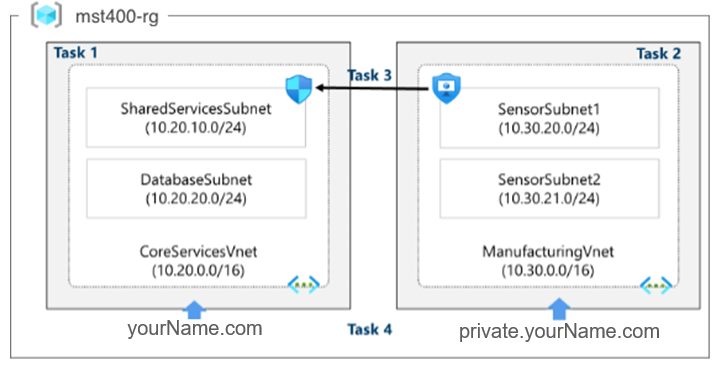
Lab scenario: your global organization is preparing to implement virtual networks. The immediate goal is to integrate all existing resources into these networks. Additionally, the organization is in a growth phase and wants to ensure there is sufficient capacity for future expansion.
In this lab, you will:
- Task 1 — Create a virtual network with subnets using the portal 15 pts
- Task 2 — Create a virtual network and subnets using a template 15 pts
- Task 3 — Create and configure communication between an Application Security Group and a Network Security Group 20 pts
- Task 4 — Configure public and private Azure DNS zones 30 pts
- Task 5 — Summary Questions & Review 20 pts
You will build this topology across Tasks 1–4.
Task 1: Create a virtual network with subnets using the portal 15 pts
The organization plans significant growth for core services. Create the virtual network and subnets to accommodate existing resources and planned growth.
-
Option Value Resource Group <yourName>-mst400-F67-rgName CoreServicesVnetRegion (US) East US -
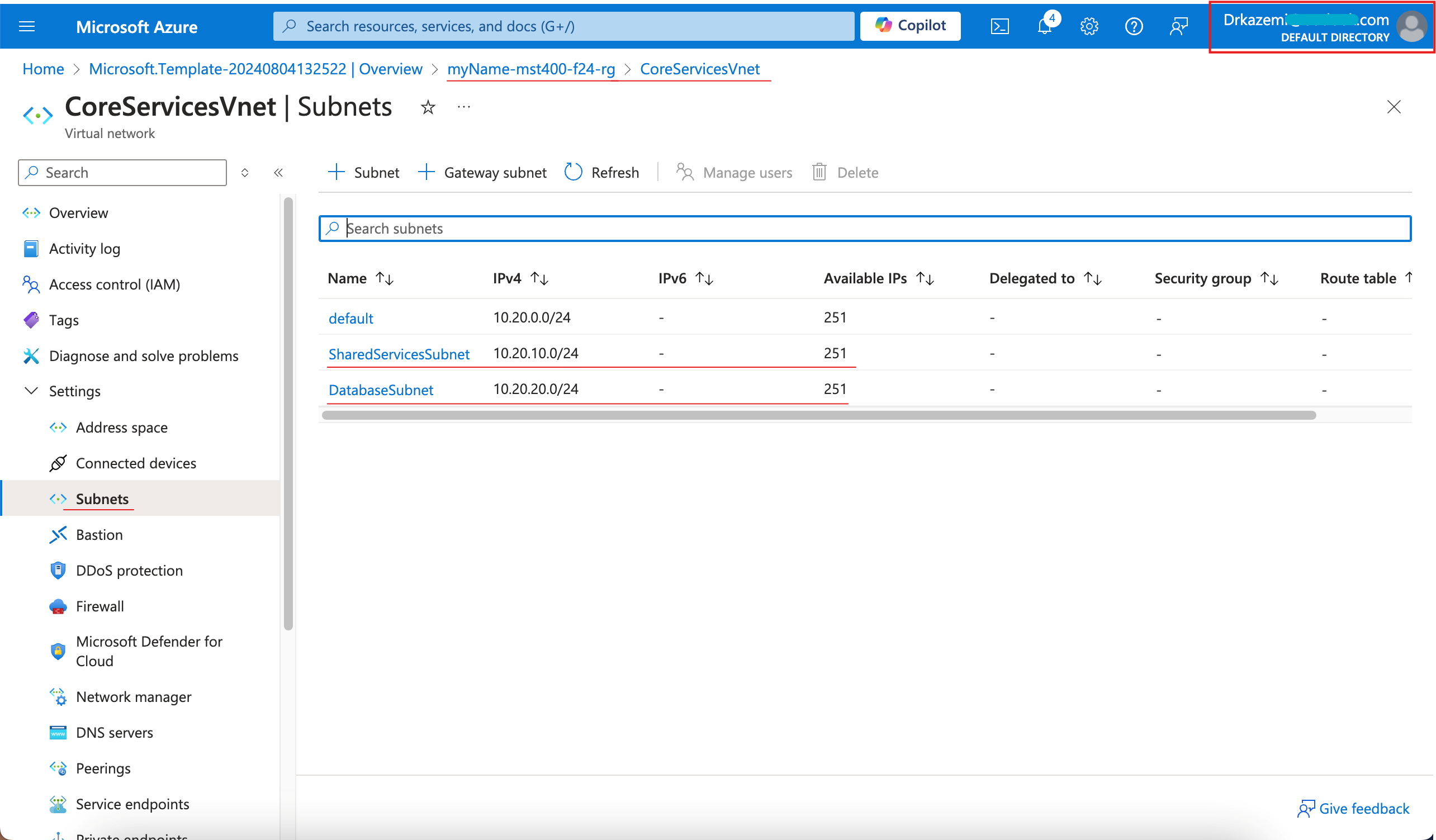
Subnet Starting address Size SharedServicesSubnet10.20.10.0 /24 DatabaseSubnet10.20.20.0 /24 - Screenshot must show your Odl_user account, VNet overview pane with address space and subnets
Task 2: Create a virtual network and subnets using a template 15 pts
Create ManufacturingVnet by editing the exported template. Manufacturing subnets are sized for expected growth.
-
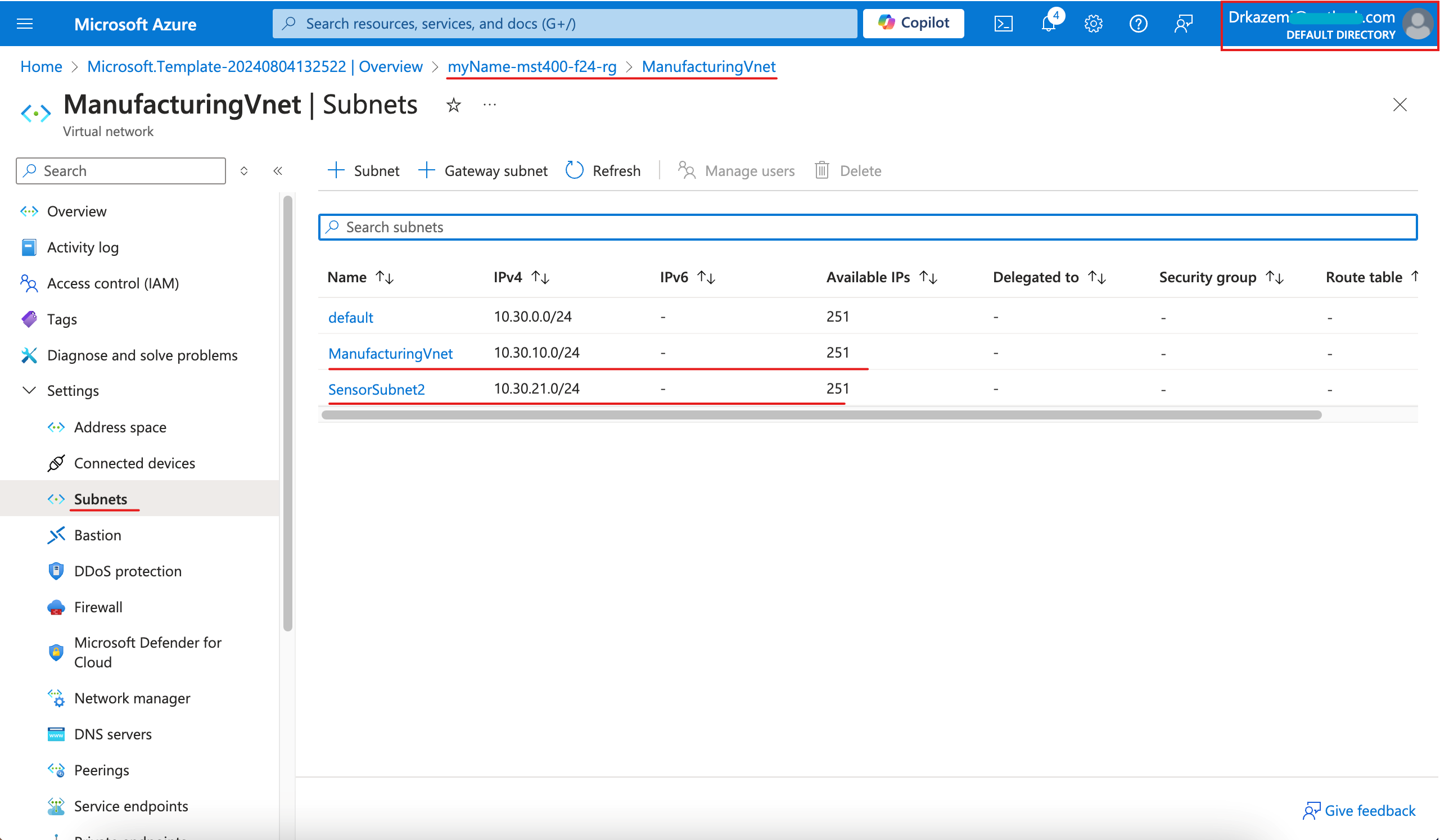
Find Replace with CoreServicesVnetManufacturingVnet10.20.0.010.30.0.0SharedServicesSubnetSensorSubnet110.20.10.0/2410.30.20.0/24DatabaseSubnetSensorSubnet210.20.20.0/2410.30.21.0/24 - Screenshot must show your Odl_user account, ManufacturingVnet overview with SensorSubnet1 and SensorSubnet2
Task 3: Create and configure communication between an Application Security Group and a Network Security Group 20 pts
In this task, create an Application Security Group (ASG) and a Network Security Group (NSG). The NSG will have an inbound rule that allows traffic from the ASG, and an outbound rule that denies internet access.
3a. Create the Application Security Group (ASG)
-
Setting Value Subscription your subscription Resource group <yourName>-mst400-F67-rgName <yourName>-asg-webRegion East US
3b. Create the NSG and associate it with the subnet
3c. Inbound rule AllowASG
-
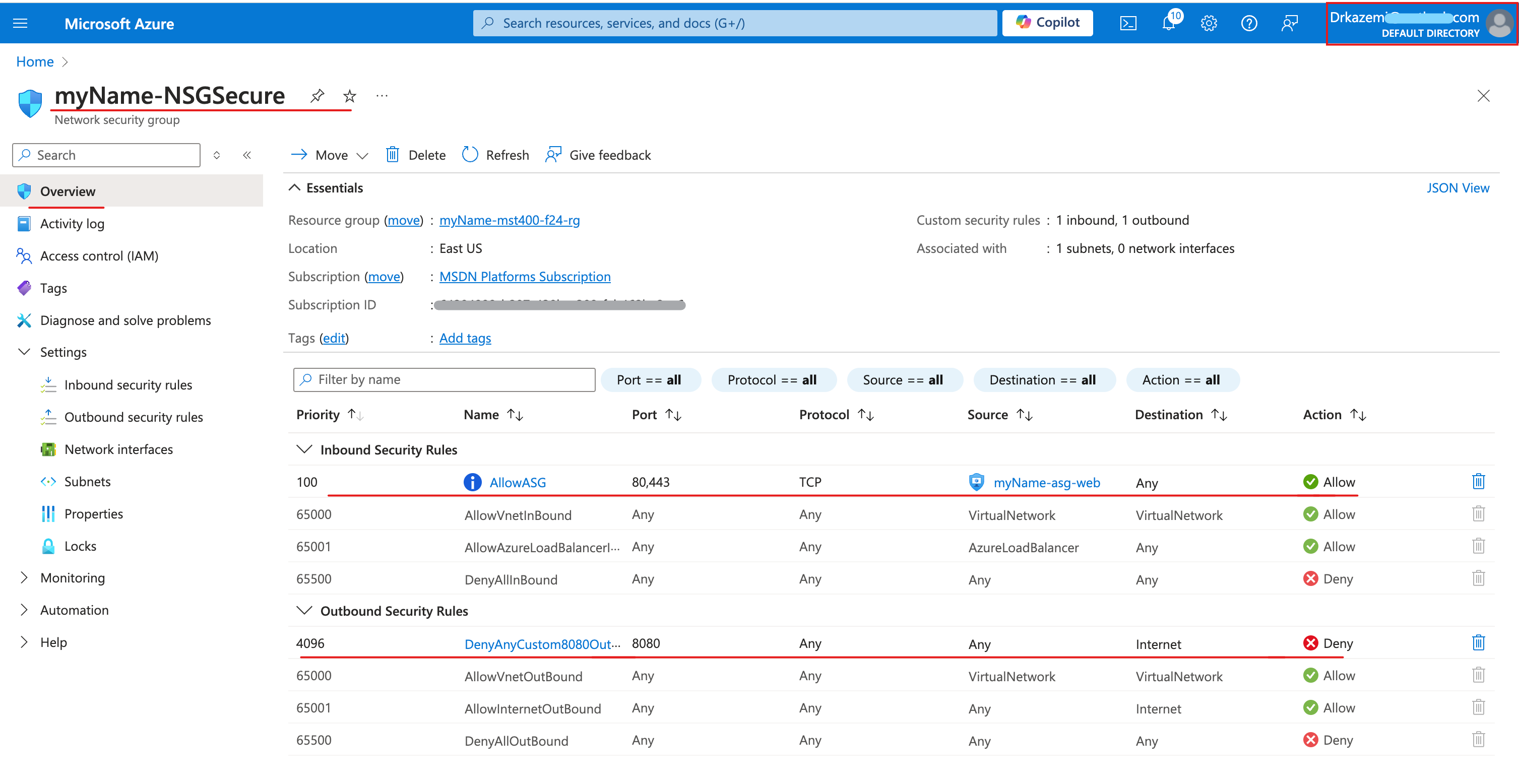
Setting Value Source Application security group → <yourName>-asg-webSource port ranges * Destination Any Destination port ranges 80,443 Protocol TCP Action Allow Priority 100 Name AllowASG
3d. Outbound rule DenyAnyCustom8080Outbound
-
Setting Value Source Any Source port ranges * Destination Service tag → Internet Destination port ranges 8080 Protocol Any Action Deny Priority 4096 Name DenyAnyCustom8080Outbound - Screenshot must show your Odl_user account, the NSG inbound rule (AllowASG) and outbound rule (DenyAnyCustom8080Outbound)
Task 4: Configure public and private Azure DNS zones 30 pts
4a. Public DNS zone
-
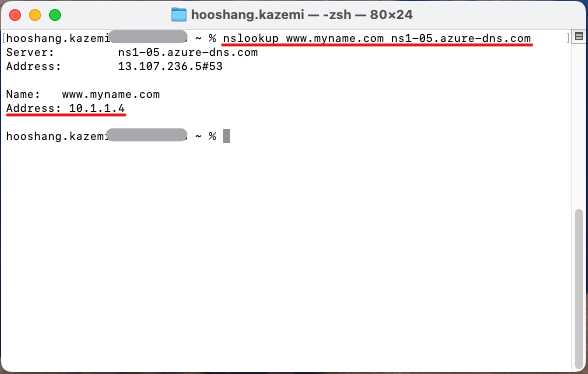
Property Value Name www Type A TTL 1 IP address 10.1.1.4 - Screenshot must show your Odl_user account, the nslookup command resolving www.yourName.com to 10.1.1.4
4b. Private DNS zone
-
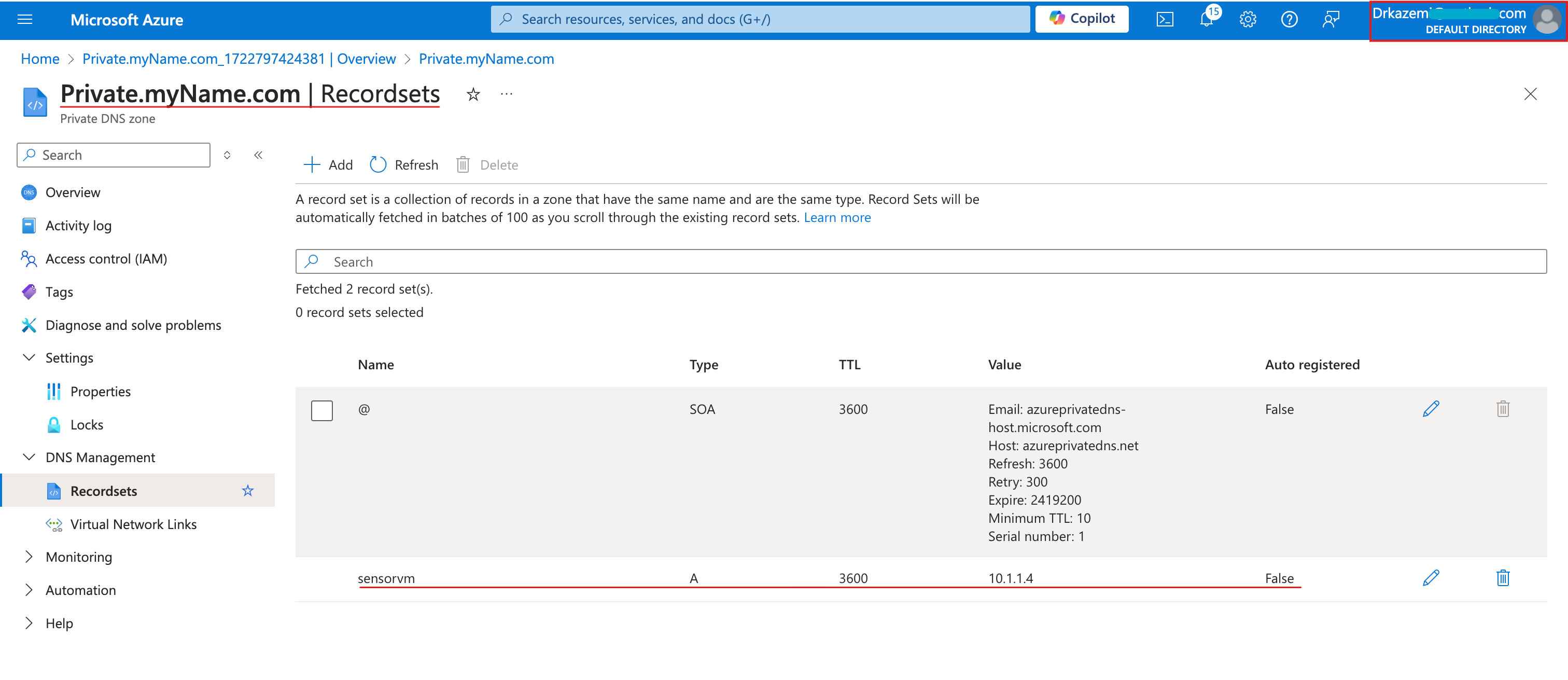
Property Value Name sensorvm Type A TTL 1 IP address 10.1.1.4 - Screenshot must show your Odl_user account, the sensorvm record set in the private DNS zone
Task 5: Summary Questions & Review 20 pts
Minimum 2-3 sentences each — original thinking, your own words!
Sample screenshots reference
These are samples only. Your screenshots may vary, but they should include similar details.
Clean up your resources
After capturing all screenshots, delete your lab resource group so you don't use up Azure credit. Keep the default resource group.
Your submission preview
Screenshots you attach above and your Task 5 answers appear here. This is exactly what prints/exported as your PDF.
MST400 Lab 01 - Implement Virtual Networking
Name: . Account: ·
Professor: Dr. Kazemi